
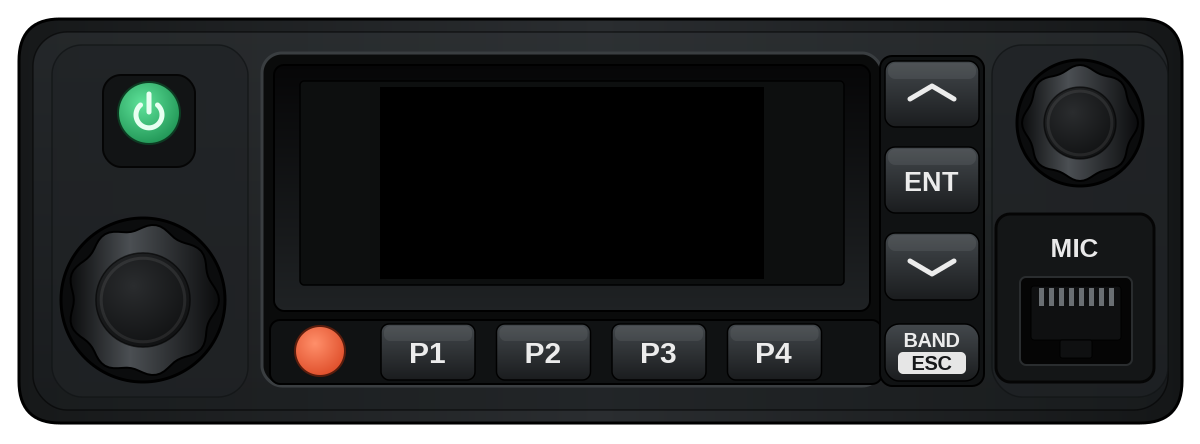
TYT MD-9600
Supportata
One image serves every board revision. On a V1-V3 radio, FM and DMR on both bands, DMR voice and data, text messages, roaming, scan, dual watch, APRS, the hotspot, each split duplex half and the USB network services work on air, with every power level checked on a wattmeter on both bands. V4A/V5 boards are detected; on older boards the radio asks for the revision once. Open: V4 boards have not run on a radio, one V4A/V5 report has DMR transmit dropping out (#750), and SFR loses inbound voice frames.
- Venduta anche come
- Retevis RT90
- Tipo
- Veicolare
- Bande
- 136-174 / 400-480 MHz
- Potenza
- up to 50 W
- Processore
- STM32F405
- Schermo
- monochrome, 128 × 64
- Lettura della tensione
- Alimentazione (ingresso DC)
- Orologio mantenuto da spenta
- Non ancora noto
Schermate
Funzioni
| Funzione | Full | Amateur | Commercial | Multimode |
|---|---|---|---|---|
| Network (USB network adapter and IP over DMR) | ||||
Leave network mode from a web pageUSB_SERIAL_REQUEST | inclusa | inclusa | inclusa | inclusa |
IP over DMR gatewayDMR_IP_GATEWAY | inclusa | inclusa | inclusa | esclusa |
Minimal TCPNET_TCP | inclusa | inclusa | inclusa | esclusa |
KISS over TCP, port 8001NET_KISS | inclusa | inclusa | esclusa | esclusa |
HTTP status page and JSON, port 80NET_HTTP | inclusa | inclusa | inclusa | esclusa |
HTTP static files stored and served gzip compressedNET_HTTP_GZIP | inclusa | inclusa | inclusa | esclusa |
Web control: the front panel page, keys, status and receive audio over /wsNET_WEBCTL | inclusa | inclusa | inclusa | esclusa |
Zone and channel control over UDP, port 4191: where the radio is, select and step, change noticesNET_RADIO_UDP | inclusa | inclusa | inclusa | esclusa |
rigctld, port 4532NET_RIGCTL | inclusa | inclusa | inclusa | esclusa |
APRS-IS clientNET_APRSIS | inclusa | inclusa | esclusa | esclusa |
Audio linking (USRP over UDP, port 34001)NET_USRP | inclusa | inclusa | inclusa | esclusa |
mDNS / DNS-SD (rfoundry-<id>.local)MDNS | inclusa | inclusa | inclusa | esclusa |
TFTP codeplug read / writeTFTP | inclusa | inclusa | inclusa | esclusa |
DMR ID database over TFTP (iddb.bin, combined codeplug.bin)TFTP_IDDB | inclusa | inclusa | inclusa | esclusa |
Compact DMR ID database (format C) read beside format NIDDB_COMPACT | inclusa | inclusa | inclusa | inclusa |
Control station mode (boot as network, PC answers data, fixed link)DMR_CONTROL_STATION | inclusa | esclusa | inclusa | esclusa |
SNMP v2c agent and traps (USB and over the air)SNMP | inclusa | esclusa | inclusa | esclusa |
USB network adapter (CDC-NCM)USB_NETWORK | inclusa | inclusa | inclusa | inclusa |
PPP on the serial host port (IPv4 into the gateway)NET_PPP | esclusa | esclusa | esclusa | esclusa |
| Radio and voice | ||||
Analog FM receive and transmitFM | inclusa | inclusa | inclusa | inclusa |
CTCSS / DCS encode and decodeSUBTONE | inclusa | inclusa | inclusa | inclusa |
DMR Tier II voice (modem, call stack, AMBE FEC, vocoder)DMR | inclusa | inclusa | inclusa | inclusa |
Basic privacy (Motorola / Anytone BP)DMR_PRIVACY | inclusa | esclusa | inclusa | esclusa |
AES-256 DMR voice, PI header and late-entry signalingDMR_AES | inclusa | esclusa | inclusa | esclusa |
Talker alias receive and sendDMR_TALKER_ALIAS | inclusa | inclusa | inclusa | inclusa |
ETSI GPS Info in the embedded LCDMR_GPS | inclusa | inclusa | inclusa | inclusa |
CSBK signaling: call alert, radio checkDMR_SIGNALING | inclusa | inclusa | inclusa | inclusa |
DMR emergency (alarm, emergency call, hot mic)DMR_EMERGENCY | inclusa | inclusa | inclusa | esclusa |
Repeater roamingDMR_ROAMING | inclusa | inclusa | inclusa | inclusa |
Tier III trunked systems: control channel, registration, following callsDMR_TRUNK | inclusa | inclusa | inclusa | inclusa |
Trunked calls and services: voice, status, short data, packet data, authenticationDMR_TRUNK_TX | inclusa | inclusa | inclusa | inclusa |
Trunked supplementary data and the short data pollDMR_TRUNK_SUPL | inclusa | inclusa | inclusa | inclusa |
Trunked calls through a system's telephone, line and dispatcher gateways: dialed digits sent with the callDMR_TRUNK_GW | inclusa | inclusa | inclusa | inclusa |
VFO (hand-tuned frequency)VFO | inclusa | inclusa | inclusa | inclusa |
FM VFOVFO_FM | inclusa | inclusa | inclusa | inclusa |
DMR VFO (color code, slot, talk target typed in; mode change FM / DMR)VFO_DMR | inclusa | inclusa | inclusa | inclusa |
Scan, band scan, dual watch, nuisance deleteSCAN | inclusa | inclusa | inclusa | inclusa |
Dual watch: A and B in any zone or the VFO, PTT on the selected one, its screens, talk backDUAL_WATCH | inclusa | inclusa | inclusa | inclusa |
Beeps and alert tonesBEEP | inclusa | inclusa | inclusa | inclusa |
Signaling tone chains (Settings > Signaling tones)SIG_TONES | inclusa | inclusa | inclusa | inclusa |
FM TX tones: roger beep, 1750 Hz burstFM_TX_TONES | inclusa | inclusa | inclusa | inclusa |
DTMF transmit from the keysDTMF | inclusa | inclusa | inclusa | inclusa |
Receive past the rated bands, Settings > AdvancedRX_EXT | non ancora scritta per questa radio | non ancora scritta per questa radio | non ancora scritta per questa radio | non ancora scritta per questa radio |
FM VOXVOX | inclusa | inclusa | inclusa | inclusa |
Frequency trim, Settings > AdvancedREF_TRIM | inclusa | inclusa | inclusa | inclusa |
Receiver battery saverBATTERY_SAVE | inclusa | inclusa | inclusa | inclusa |
GPS receiver: the module driver and its NMEA input (Settings > Location > GPS)GPS | inclusa | inclusa | inclusa | inclusa |
D-STAR digital voice: GMSK modem, headers, slow data, clean-room AMBE codecDSTAR | non ancora scritta per questa radio | non ancora scritta per questa radio | non ancora scritta per questa radio | non ancora scritta per questa radio |
Yaesu System Fusion (C4FM): FICH, callsign data, DN voice with the radio's own codecYSF | non ancora scritta per questa radio | non ancora scritta per questa radio | non ancora scritta per questa radio | non ancora scritta per questa radio |
Fusion Voice FR (VW): the full-rate frame and layout, played and sent through core/mbe's codecYSF_VW | non ancora scritta per questa radio | non ancora scritta per questa radio | non ancora scritta per questa radio | non ancora scritta per questa radio |
Fusion through a modem chip's air interface: the board's FM copy into the core's soft modem, for a radio with no flat FM tapYSF_AIR | esclusa | esclusa | esclusa | esclusa |
Key assignment (Settings > Keys, codeplug)KEY_ASSIGN | inclusa | inclusa | inclusa | inclusa |
Channels list: every channel by number, a channel's settings (hub 5)CHANNEL_LIST | inclusa | inclusa | inclusa | inclusa |
Channel editor: edit a channel, New channel from current settings, text entryCHANNEL_EDIT | inclusa | inclusa | inclusa | inclusa |
Zone editor: move, add, copy and remove channels in a zone; rename, copy and delete a zoneZONE_EDIT | inclusa | inclusa | inclusa | inclusa |
Contact editor: a new contact from Find or a call's actions (name, ID, type, timeslot)CONTACT_EDIT | inclusa | inclusa | inclusa | inclusa |
Volume bar when a knob the MCU reads turns (#354)VOLUME_BAR | inclusa | inclusa | inclusa | inclusa |
P25 channels in the codeplug: the conventional codecP25 | inclusa | inclusa | inclusa | inclusa |
P25 trunked systems in the codeplug: the codecP25_TRUNK | inclusa | inclusa | inclusa | inclusa |
NXDN conventional voice, 4800 and 9600 bit/s: the frame codec, receive, the call layer, the engine and the NXDN mode in the radio coreNXDN | inclusa | inclusa | inclusa | inclusa |
NXDN Scrambler (15-bit)NXDN_SCRAMBLER | inclusa | esclusa | inclusa | inclusa |
| DMR data | ||||
Text messages (ETSI IP text by default)DMR_SMS | inclusa | inclusa | inclusa | inclusa |
Motorola TMS text formatDMR_TMS | inclusa | esclusa | inclusa | esclusa |
ARS registrationDMR_ARS | inclusa | esclusa | inclusa | esclusa |
LRRP locationDMR_LRRP | inclusa | esclusa | inclusa | esclusa |
Zone and channel sharing: send a zone or a channel, import an offered oneZONE_SHARE | inclusa | inclusa | inclusa | esclusa |
Compressed UDP/IP headers on transmit (SAP 3)DMR_UDP_COMPRESS | inclusa | inclusa | inclusa | inclusa |
Single frequency repeater: MMDVM SFR, and the standalone SFR (experimental)SFR | inclusa | inclusa | inclusa | inclusa |
Experimental: SFR user receive "dual-path RX": a voice frame whose FEC failed comes from the other copySFR_DUALPATH_RX | inclusa | inclusa | inclusa | inclusa |
Experimental: standalone SFR repeater's periodic CW ID (callsign in Morse, FM)SFR_CWID | inclusa | inclusa | inclusa | inclusa |
APRS: AFSK positions, status, messages; DMR positions; KISS TNCAPRS | inclusa | inclusa | esclusa | inclusa |
APRS on FM: AX.25 / AFSK packets, messages, KISS TNCAPRS_AFSK | inclusa | inclusa | esclusa | inclusa |
APRS over DMR: LRRP or UDT positions to a gateway IDAPRS_DMR | inclusa | inclusa | esclusa | inclusa |
APRS receive: demodulator, station list, digipeaterAPRS_RX | inclusa | inclusa | esclusa | inclusa |
APRS iGate rules (with tools/aprs_gate.py)APRS_IGATE | inclusa | inclusa | esclusa | inclusa |
GPS screen: sky plot, signal bars, grid locator (Tools > Position)GPS_SKY | inclusa | inclusa | inclusa | inclusa |
| Host link and USB | ||||
Task stacks in the debug link viewTASK_STACKS | inclusa | inclusa | inclusa | inclusa |
USB deviceUSB | inclusa | inclusa | inclusa | inclusa |
Host link: hotspot, CPS, debug link on the host portHOSTLINK | inclusa | inclusa | inclusa | inclusa |
MMDVM hotspotHOTSPOT | inclusa | inclusa | esclusa | inclusa |
Split duplex repeater (two radios, one duplex modem)HOTSPOT_SPLIT | inclusa | inclusa | esclusa | esclusa |
Debug linkDEBUGLINK | inclusa | inclusa | inclusa | inclusa |
Open-firmware CPS protocol (qdmr)CPS_OPENFW | inclusa | inclusa | inclusa | inclusa |
Fast codeplug protocol (debug link CODEPLUG)CPS_FAST | inclusa | inclusa | inclusa | inclusa |
Loader hand-over (stub entry, command 0x1A)STUB_ENTRY | inclusa | inclusa | inclusa | inclusa |
Crash logCRASH_LOG | inclusa | inclusa | inclusa | inclusa |
Crash log screenCRASH_SCREEN | inclusa | inclusa | inclusa | inclusa |
Crash report over DMRCRASH_REPORT | inclusa | inclusa | inclusa | inclusa |
Hardware watchdogWATCHDOG | inclusa | inclusa | inclusa | inclusa |
| User interface | ||||
Diagnostics pageDIAG | inclusa | inclusa | inclusa | inclusa |
Backlight test pagesBACKLIGHT_TEST | esclusa | esclusa | esclusa | esclusa |
Spanish on the radioLANG_ES | esclusa | esclusa | esclusa | esclusa |
Italian on the radioLANG_IT | esclusa | esclusa | esclusa | esclusa |
French on the radioLANG_FR | esclusa | esclusa | esclusa | esclusa |
Chinese on the radioLANG_ZH | esclusa | esclusa | esclusa | esclusa |
Chinese glyph table for channel namesCJK_GLYPHS | esclusa | esclusa | esclusa | esclusa |
Start in SpanishLANG_DEFAULT_ES | esclusa | esclusa | esclusa | esclusa |
Start in ItalianLANG_DEFAULT_IT | esclusa | esclusa | esclusa | esclusa |
Start in FrenchLANG_DEFAULT_FR | esclusa | esclusa | esclusa | esclusa |
Start in ChineseLANG_DEFAULT_ZH | esclusa | esclusa | esclusa | esclusa |
Settings menu on the radioUI_SETTINGS | inclusa | inclusa | inclusa | inclusa |
Support info on About and the debug link (build source, chips, image hash)SUPPORT_INFO | inclusa | inclusa | inclusa | inclusa |
Satellite TLE catalog, pass prediction and Doppler compensationSATELLITE_TLE | inclusa | inclusa | esclusa | inclusa |
| Built by default on each radio | ||||
CJK_FONT_IN_FLASHCJK_FONT_IN_FLASH | esclusa | esclusa | esclusa | esclusa |
PINYINPINYIN | esclusa | esclusa | esclusa | esclusa |
PINYIN_IN_FLASHPINYIN_IN_FLASH | esclusa | esclusa | esclusa | esclusa |
● inclusa · ○ esclusa
Non disponibile su questa radio: 16x32 font, Anti-aliased fonts, Larger text, Color screen settings (theme, highlight color, filled status bar), Vibration alerts (Settings > Sound > Vibrate), Settings and codeplug storage on SPI NAND, Fault trace on the host UART, Air band AM receive (108-137 MHz), Broadcast FM receiver
Entrare in modalità aggiornamento
- Disconnect the radio's DC power cable (the power key alone is not enough) and connect the USB cable to the mini-USB port on the rear.
- Hold P1 and the orange (alarm) key while you connect the power again. The screen stays blank and the backlight blinks once a second.
- Release the keys.